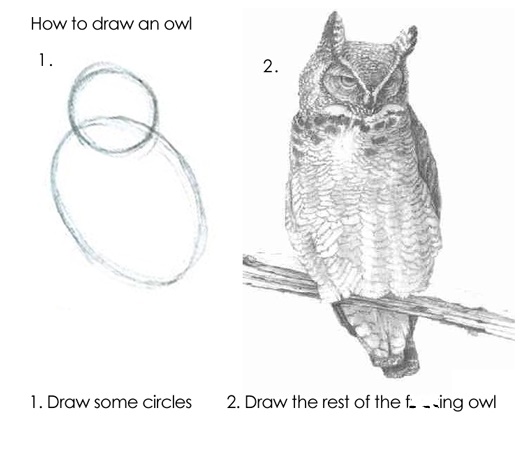
5 now draw the rest of the owl
In the prior chapter, you explored several different sources for learning how to code in R. Now it’s time to explore other approaches. Take a break from reading, and spend some time coding and consolidating, reviewing tutorials, or playing with data.
5.1 time for hands-on experience
If you want to work actively with a dataset, here are two possibilities. (You are not limited to just these, so if you want to look at something else that’s fine too). Each of these datasets has been supplied as its own package.
5.1.1 consider loading the tidyverse
The tidyverse allows the use of the ‘pipe’ operator, (“%>%”), which is useful for combining commands. Now there is a native pipe in Base R (“|>”), which does the same thing. But we will be using the tidyverse for a number of reasons, so go ahead and install it if you haven’t already, then load it.
Remember that any package needs to be installed on your machine once before progressing. That is, if you installed the tidyverse previously, you don’t need to do the first line here. If you haven’t installed the tidyverse, you should remove the octothorpe or pound sign (#) on the second line before running this next chunk:
5.1.2 now explore the babynames package
The babynames dataset is described here. What is in the data? What interesting questions might you ask about the dataset?
## tibble [1,924,665 × 5] (S3: tbl_df/tbl/data.frame)
##  $ year: num [1:1924665] 1880 1880 1880 1880 1880 1880 1880 1880 1880 1880 ...
##  $ sex : chr [1:1924665] "F" "F" "F" "F" ...
##  $ name: chr [1:1924665] "Mary" "Anna" "Emma" "Elizabeth" ...
##  $ n   : int [1:1924665] 7065 2604 2003 1939 1746 1578 1472 1414 1320 1288 ...
## $ prop: num [1:1924665] 0.0724 0.0267 0.0205 0.0199 0.0179 ...## # A tibble: 5 × 5
## year sex name n prop
## <dbl> <chr> <chr> <int> <dbl>
## 1 1999 F Nelia 5 0.00000257
## 2 2009 F Michaela 875 0.000433
## 3 2008 F Promiss 10 0.00000481
## 4 2017 F Deilani 7 0.00000373
## 5 1992 F Chantel 629 0.0003145.1.3 or the (ggplot2)movies package
The index page for the movies dataset is here.
## tibble [58,788 × 24] (S3: tbl_df/tbl/data.frame)
##  $ title      : chr [1:58788] "$" "$1000 a Touchdown" "$21 a Day Once a Month" "$40,000" ...
##  $ year       : int [1:58788] 1971 1939 1941 1996 1975 2000 2002 2002 1987 1917 ...
##  $ length     : int [1:58788] 121 71 7 70 71 91 93 25 97 61 ...
##  $ budget     : int [1:58788] NA NA NA NA NA NA NA NA NA NA ...
##  $ rating     : num [1:58788] 6.4 6 8.2 8.2 3.4 4.3 5.3 6.7 6.6 6 ...
##  $ votes      : int [1:58788] 348 20 5 6 17 45 200 24 18 51 ...
##  $ r1         : num [1:58788] 4.5 0 0 14.5 24.5 4.5 4.5 4.5 4.5 4.5 ...
##  $ r2         : num [1:58788] 4.5 14.5 0 0 4.5 4.5 0 4.5 4.5 0 ...
##  $ r3         : num [1:58788] 4.5 4.5 0 0 0 4.5 4.5 4.5 4.5 4.5 ...
##  $ r4         : num [1:58788] 4.5 24.5 0 0 14.5 14.5 4.5 4.5 0 4.5 ...
##  $ r5         : num [1:58788] 14.5 14.5 0 0 14.5 14.5 24.5 4.5 0 4.5 ...
##  $ r6         : num [1:58788] 24.5 14.5 24.5 0 4.5 14.5 24.5 14.5 0 44.5 ...
##  $ r7         : num [1:58788] 24.5 14.5 0 0 0 4.5 14.5 14.5 34.5 14.5 ...
##  $ r8         : num [1:58788] 14.5 4.5 44.5 0 0 4.5 4.5 14.5 14.5 4.5 ...
##  $ r9         : num [1:58788] 4.5 4.5 24.5 34.5 0 14.5 4.5 4.5 4.5 4.5 ...
##  $ r10        : num [1:58788] 4.5 14.5 24.5 45.5 24.5 14.5 14.5 14.5 24.5 4.5 ...
##  $ mpaa       : chr [1:58788] "" "" "" "" ...
##  $ Action     : int [1:58788] 0 0 0 0 0 0 1 0 0 0 ...
##  $ Animation  : int [1:58788] 0 0 1 0 0 0 0 0 0 0 ...
##  $ Comedy     : int [1:58788] 1 1 0 1 0 0 0 0 0 0 ...
##  $ Drama      : int [1:58788] 1 0 0 0 0 1 1 0 1 0 ...
##  $ Documentary: int [1:58788] 0 0 0 0 0 0 0 1 0 0 ...
##  $ Romance    : int [1:58788] 0 0 0 0 0 0 0 0 0 0 ...
## $ Short : int [1:58788] 0 0 1 0 0 0 0 1 0 0 ...## # A tibble: 5 × 24
## title year length budget rating votes r1 r2 r3 r4 r5 r6
## <chr> <int> <int> <int> <dbl> <int> <dbl> <dbl> <dbl> <dbl> <dbl> <dbl>
## 1 Operatio… 1945 3 NA 7.1 5 0 0 0 0 24.5 24.5
## 2 Bingo Ro… 2000 84 NA 4.1 20 4.5 14.5 14.5 4.5 4.5 4.5
## 3 Agony an… 1965 138 NA 6.6 689 4.5 4.5 4.5 4.5 4.5 14.5
## 4 Those We… 1940 74 NA 7.6 5 0 0 0 0 24.5 24.5
## 5 Wotta Ni… 1939 7 NA 6.7 12 0 4.5 0 0 0 24.5
## # ℹ 12 more variables: r7 <dbl>, r8 <dbl>, r9 <dbl>, r10 <dbl>, mpaa <chr>,
## # Action <int>, Animation <int>, Comedy <int>, Drama <int>,
## # Documentary <int>, Romance <int>, Short <int>Regardless of whether you have played with one or both of these datasets, worked with the tutorials, or something else, please be prepared to share your experiences with the class at our next meeting.
5.2 assignment
In our next meeting, go as far as you can with the following:
Open the dataset. Describe the data in a paragraph based on one or more R functions (such as str, glimpse, and slice).
- What are the variables? What are the observations? What are the data types? What are the ranges of the variables? Are there missing values?
After looking at the data, describe one or more questions of interest that you would like to ask about the data. (I do mean “of interest” - something that has meaning, that people would actually like to know).
- Write each question in a separate paragraph. Use headings to structure your document.
Describe, in words, how you would do look at your question. Be as specific as possible, but don’t worry about R syntax (e.g., I would pull out such-and-such variables, or such-and-such observations, and I would compare them with x, or I would like this with ‘y’). Explain what you might find, and why (again) that would be interesting.
- Now draw the rest of the owl - translate your words into code, and run the analysis.
If appropriate, describe what a graph or visualization of the data might look like.
- go for it if you can.
Save your work as an R markdown document, and knit it to an html file.